Stop letting curiosity compete with focus.
Alan Turing
Assumes you understand
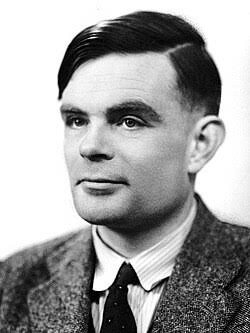
Alan Turing was a British mathematician, logician, and wartime codebreaker whose work helped define what computers could be. He is best known for the idea of the “Turing machine,” a theoretical model that explained how computation works in a precise mathematical way. That concept became one of the foundations of computer science.
During World War II, Turing played a major role in breaking German codes, especially through his work at Bletchley Park. His efforts helped the Allies gain crucial intelligence, and his wartime work showed how abstract mathematics could have real-world impact. He was also among the first to seriously ask whether machines could think.
Turing’s legacy extends into artificial intelligence, theoretical computer science, and modern cryptography. His famous test for machine intelligence remains a major reference point in AI discussions today. Although his life ended tragically early, his ideas shaped the digital age in ways that still matter.
“Turing is widely considered to be the father of theoretical computer science and artificial intelligence.”
Built for people who follow ideas
One hotkey, and it's saved
Highlight something interesting, press the hotkey, and keep reading. Tangnt grabs the text, or a screenshot if there's nothing to select, and remembers exactly where it came from.
- Works from any app on your Mac
- Text or a screenshot, whichever fits
- The source app and window come along for free
Attention Is All You Need
The dominant sequence transduction models are based on complex recurrent or convolutional neural networks. We propose a new simple network architecture, the Transformer, based solely on attention mechanisms, dispensing with recurrence and convolutions entirely. Experiments on two machine translation tasks show these models to be superior in quality while being more parallelizable and requiring significantly less time to train.
The Transformer, based solely on attention mechanisms
A sequence transduction model built entirely on attention, without recurrence or convolutions.
“the Transformer, based solely on attention mechanisms”
It does the research so you don't stop
While you stay in your article, Tangnt searches the web, writes a short synopsis, and figures out what you'd need to know first. Every claim comes with a real citation.
- Web research happens quietly in the background
- A synopsis, a title, and the concepts it builds on
- Citations quoted word-for-word from their sources
The Transformer, based solely on attention mechanisms
A sequence transduction model built entirely on attention, without recurrence or convolutions. Experiments on machine translation show these models to be superior in quality while being more parallelizable.
The architecture relies on scaled dot-product attention and multi-head attention layers, dispensing with recurrence and convolutions entirely.
“the Transformer, based solely on attention mechanisms”
Your notes find each other
No folders, no tags to maintain. Notes connect by what they mean, so a paper you saved last month links itself to the article you captured today. Open the graph and follow the thread.
- Notes link automatically when they're about related things
- Arrows point to what you should read first
- Chat with any note, with its neighbors as context
Reading isn't understanding
Tangnt is honest about the difference. A note only counts as understood when you can explain it back in your own words, and the Debt tab keeps score of everything you've saved but never really learned.
- Every note is surface, skimmed, or resolved
- A short quiz, answered in your own words, is the only way up
- Debt shows what's blocked and what you never opened
Why attention has become the internet's scarcest resource
Assumes you understand
attention economicsThe argument treats attention as a scarce resource allocated in real time, not an innate capacity — with implications for how platforms compete for it.
Anything, Everything, Everywhere
 Firefox
 YouTube
 Notion
 Slack
Slack Discord
 WhatsApp
 Mail
Mail Gmail
Gmail GitHub
 Reddit
 X
X OpenAI
 Anthropic
 Gemini
And anything else on your Mac you can select or screenshot.
From tangent to understanding
Attention Is All You Need
The dominant sequence transduction models are based on complex recurrent or convolutional neural networks. We propose a new simple network architecture, the Transformer, based solely on attention mechanisms, dispensing with recurrence and convolutions entirely. Experiments on two machine translation tasks show these models to be superior in quality while being more parallelizable and requiring significantly less time to train.
the Transformer, based solely on attention mechanisms
Save it without stopping
You highlight a sentence, press the hotkey, and keep reading. A few seconds later the note has written itself: a synopsis, a proper title, and citations pulled from real sources.
See plans and pricing →Pricing
Free trial
7 days
- 10 captures
- 5 chat messages
- Card required to start
Includes:
- Access to everything
After 7 days, automatically converts to Light at $5.99/mo unless you cancel before the trial ends.
Light
$5.99/mo
- 100 captures per month
- 15 chat messages per month
Includes:
- Knowledge graph
- Session tree
- Knowledge debt
- AI synopsis
- AI chat
- Knowledge threads
Pro
$14.99/mo
- 400 captures per month
- 60 chat messages per month
Includes:
- Knowledge graph
- Session tree
- Knowledge debt
- AI synopsis
- AI chat
- Knowledge threads
Polymath
$29.99/mo
- 1,000 captures per month
- 150 chat messages per month
Includes:
- Knowledge graph
- Session tree
- Knowledge debt
- AI synopsis
- AI chat
- Knowledge threads
Cancel anytime from Settings in the app — self-serve and instant. A full refund is available within 3 days of any charge.
From the people testing it daily
“I stopped losing an afternoon to research rabbit holes. I capture the tangent and get straight back to what I was doing.”
“The graph is the first thing that's made my reading feel like a map instead of a pile of open tabs.”
“The quiz step is annoying in the best possible way. It's the first tool that's called my bluff on ‘understanding’ something.”
“Every client research rabbit hole used to live in twelve browser tabs. Now it lives in one graph I can actually search.”
“The prerequisite links are the sneaky-good feature. It quietly tells me what I'm missing before I waste an hour confused.”
Give your curiosity somewhere to land.
Tangnt is currently in private testing on macOS. Join the waitlist to get early access as it opens up.
No spam. One email when accounts open up.